


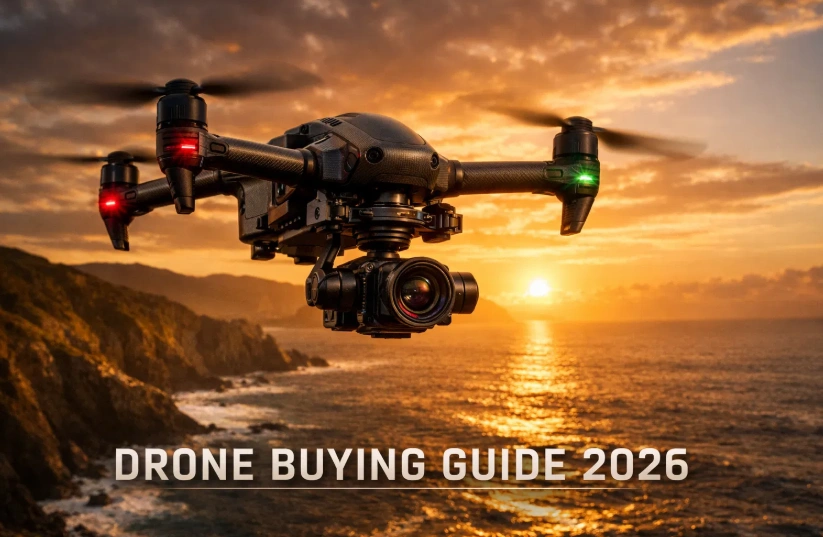
TLDR
- Discover the best drones across all price ranges from budget-friendly models under $200 to professional-grade options exceeding $2,000.
- Learn about essential drone features including camera quality, flight time, range, and obstacle avoidance technology.
- Understand the key differences between consumer drones, prosumer models, and professional cinematography drones.
- Get expert recommendations for specific use cases like aerial photography, travel vlogging, real estate, and recreational flying.
- Navigate drone regulations and registration requirements to fly legally and safely in 2026.
Are you ready to take your photography to new heights literally? The drone market in 2026 has exploded with options, offering everything from pocket-sized wonders to professional cinematography powerhouses. According to the Federal Aviation Administration, over 850,000 recreational drones were registered in the United States alone in 2025, and that number continues to climb.
Whether you’re a complete beginner looking to capture stunning aerial shots of your weekend adventures, a content creator seeking cinematic footage, or a professional photographer expanding your services, this drone buying guide will help you navigate the overwhelming choices available today. The right drone isn’t necessarily the most expensive one it’s the one that perfectly matches your needs, skill level, and budget.
In this comprehensive guide, we’ll break down everything you need to know about purchasing a drone in 2026, from understanding technical specifications to finding the best models for your specific requirements. By the end, you’ll have the confidence to make an informed decision and join the exciting world of aerial photography.
Understanding Drone Categories and Price Ranges
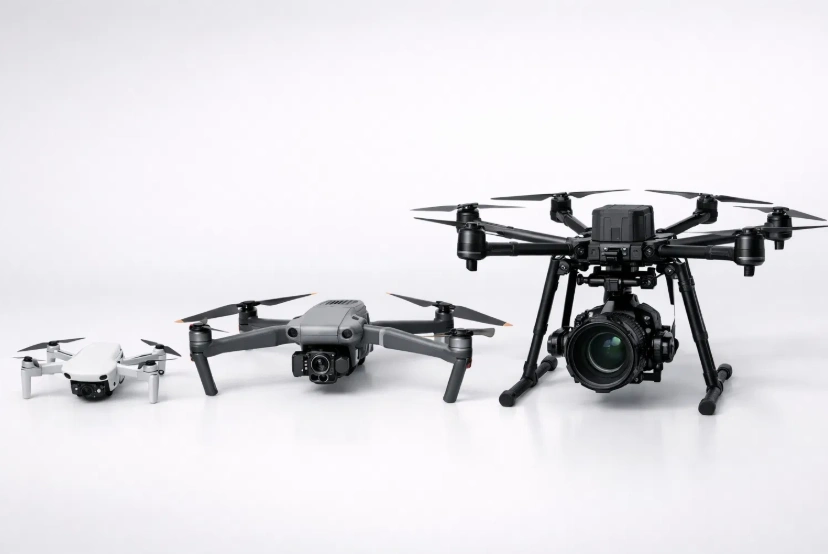
Before diving into specific recommendations, it’s crucial to understand how drones are categorized. The drone buying guide landscape has evolved significantly, with manufacturers now offering specialized models for different user profiles and budgets.
Budget Drones (Under $300)
Budget drones have come a long way from their toy-like predecessors. Today’s affordable models offer surprising capabilities that were once exclusive to premium devices. These entry-level drones typically feature:
- Basic camera systems (720p to 1080p video resolution)
- Flight times ranging from 15-25 minutes
- Control ranges between 100-500 meters
- Simple obstacle avoidance or none at all
- Compact, foldable designs for portability
Budget drones are perfect for beginners who want to learn flight mechanics without significant financial commitment. They’re also excellent for casual users who occasionally want aerial perspectives during family trips or outdoor adventures. Popular models in this category include the DJI Mini SE successor and Holy Stone’s latest offerings.
Mid-Range Drones ($300-$1,500)
This category represents the sweet spot for most enthusiasts and semi-professional users. Mid-range drones deliver professional-quality results without the premium price tag. Key features include:
- High-quality cameras (4K video at 30-60fps, 12-20MP photos)
- Extended flight times (25-35 minutes)
- Advanced obstacle avoidance systems
- Intelligent flight modes (ActiveTrack, Point of Interest, Waypoints)
- Improved transmission range (up to 10 kilometers)
- RAW photo capabilities for serious editing
According to DroneDJ’s 2026 market analysis, approximately 65% of drone purchases fall within this mid-range category, as users recognize the significant value proposition these models offer.
Image unavailable
Professional Drones ($1,500+)
Professional drones are engineered for commercial applications, including cinematography, surveying, inspection, and mapping. These high-end models feature:
- Cinema-grade cameras (5.1K to 8K video, large sensors)
- Interchangeable lens systems
- Extended flight times (35-45+ minutes)
- Omnidirectional obstacle avoidance
- Advanced transmission systems with redundancy
- Weather resistance and durability
- ProRes and other professional codecs
Professionals working in real estate, film production, construction, and agriculture rely on these premium models to deliver client-ready footage and data.
Essential Drone Features to Consider
When following any best drone buying guide, understanding key specifications helps you make informed comparisons between models. Let’s explore the features that truly matter.
Camera Quality and Sensor Size
The camera is arguably the most critical component for most drone buyers. In 2026, even budget models offer respectable video quality, but significant differences exist:
Sensor Size: Larger sensors capture more light, producing better low-light performance and dynamic range. A 1-inch sensor dramatically outperforms smaller 1/2.3-inch sensors common in budget drones. Professional models may feature even larger Micro Four Thirds or APS-C sensors.
Resolution: While 4K has become standard, 5.1K and higher resolutions provide additional flexibility for cropping and stabilization in post-production. Don’t be fooled by 8K marketing most content creators find 4K perfectly adequate.
Bit Depth and Color Profiles: Professional and prosumer drones offer 10-bit color depth and D-Log profiles, providing greater flexibility in color grading compared to standard 8-bit footage.
Flight Time and Battery Management
Flight time directly impacts your shooting capabilities. A drone with 30 minutes of advertised flight time typically provides 25 minutes of actual usable time. Consider these factors:
- Most productive flights use only 70-80% of battery capacity for safety
- Cold weather significantly reduces flight time
- Aggressive flying and wind resistance drain batteries faster
- Having 2-3 batteries is essential for serious work
Calculate your real-world needs: A 25-minute flight time means approximately 20 minutes of actual shooting time, with 3 batteries providing about an hour of productive work.
Obstacle Avoidance Systems
Modern obstacle avoidance has evolved from basic forward sensors to comprehensive omnidirectional systems. These technologies use combinations of:
- Visual sensors (cameras)
- Time-of-flight sensors
- Infrared sensors
- APAS (Advanced Pilot Assistance Systems)
Advanced systems not only detect obstacles but can autonomously navigate around them. This feature proves invaluable when flying in complex environments, following subjects through wooded areas, or operating in unfamiliar locations. According to Research and Markets’ 2026 Drone Industry Report, drones with comprehensive obstacle avoidance experience 73% fewer crashes than those without.
Transmission Range and Signal Reliability
Transmission technology has advanced significantly, with current systems offering:
OcuSync 4.0 and Equivalent Systems: DJI’s latest transmission protocol and competing technologies from other manufacturers provide ranges exceeding 15 kilometers with low latency and high reliability.
Dual-Frequency Transmission: Modern controllers automatically switch between 2.4GHz and 5.8GHz frequencies to avoid interference.
Live Feed Quality: Most mid-range and professional drones now offer 1080p live transmission, allowing pilots to see exactly what they’re capturing in real-time.
Remember that legal restrictions and safety considerations typically limit practical flying distances far below maximum transmission ranges.
Image unavailable
Portability and Design
Portability matters more than many first-time buyers realize. Consider:
Foldable vs. Fixed-Frame Designs: Foldable drones offer superior portability but may sacrifice some structural rigidity. Fixed-frame professional drones prioritize durability and performance.
Weight Classifications: Drone weight affects both regulations and flying characteristics. The 250-gram threshold remains important for registration requirements in many jurisdictions.
Case and Transportation: Quality carrying cases protect your investment and organize accessories. Some manufacturers include cases, while others require separate purchases.
Top Drone Recommendations by Budget
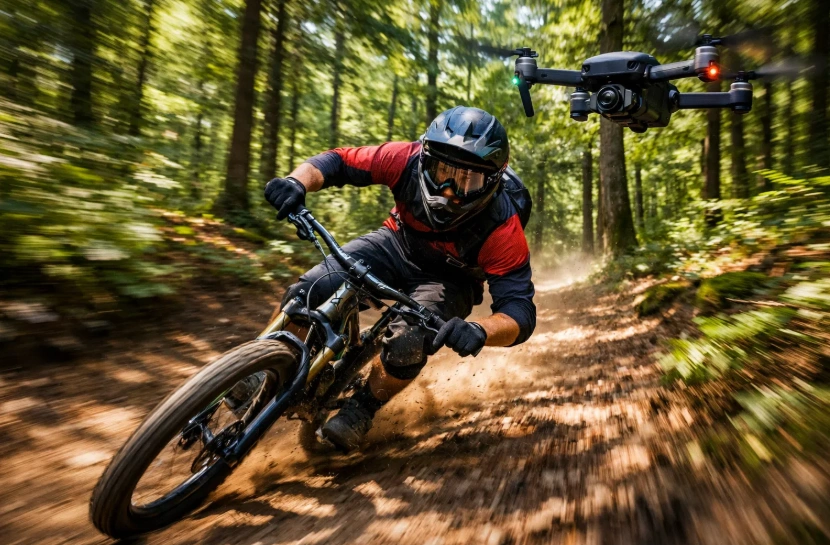
Let’s examine specific models that represent the best value and performance in their respective categories. This drone buying guide focuses on models available in 2026 that consistently receive positive reviews from both users and professionals.
Best Budget Drones (Under $300)
DJI Mini 3 (2026 Edition) – $279
The latest iteration of DJI’s popular Mini series continues to dominate the budget category. Weighing just 249 grams, it avoids many registration requirements while delivering impressive performance:
- 4K/30fps video with 2.7K/60fps option
- 32-minute flight time
- 10km transmission range
- Basic obstacle avoidance (forward and downward)
- Vertical shooting mode for social media
- Wind resistance up to 38 kph
This model represents the best entry point for beginners serious about aerial photography. Its combination of portability, capability, and ease of use makes it ideal for travel vloggers and recreational pilots.
Autel Nano+ (2026) – $299
Autel’s competitor to the Mini series offers slightly different features:
- 4K/30fps with HDR capability
- 28-minute flight time
- Phase detection autofocus for sharper images
- Three-way obstacle avoidance
- Slightly larger sensor for better low-light performance
The Nano+ appeals to users who prioritize camera quality and obstacle avoidance over the absolute lightest weight.
Best Mid-Range Drones ($300-$1,500)
DJI Air 3S – $1,099
The Air 3S represents exceptional value in the mid-range segment, offering near-professional capabilities:
- Dual camera system (50MP wide and 48MP telephoto)
- 4K/60fps video, 5.1K/30fps option
- 45-minute flight time (industry-leading)
- Omnidirectional obstacle avoidance with APAS 5.0
- 20km OcuSync transmission
- 10-bit D-Log M color profile
This drone excels for serious enthusiasts, real estate photographers, and content creators who need professional results without professional pricing. The dual-camera system eliminates the need for lens changes and provides creative flexibility.
Skydio 2+ Pro – $1,349
Known for the most advanced obstacle avoidance system available, the Skydio 2+ Pro uses six 4K navigation cameras and AI-powered tracking:
- Best-in-class autonomous flight and tracking
- 4K/60fps video
- 27-minute flight time
- 360-degree obstacle avoidance
- Ideal for action sports and complex environments
- American-made option for certain commercial applications
While the camera doesn’t match the Air 3S’s specifications, the Skydio’s tracking and obstacle avoidance capabilities are unmatched, making it perfect for filming fast-moving subjects in challenging environments.
Autel EVO Nano+ Premium Bundle – $899
This package provides excellent value with included accessories:
- 4K/60fps HDR video
- 35-minute flight time
- Three-axis gimbal stabilization
- Multiple batteries and carrying case included
- User-replaceable components
- No forced geographic restrictions
Autel’s ecosystem appeals to users who value flexibility and prefer avoiding manufacturer restrictions common with some competitors.
Best Professional Drones ($1,500+)
DJI Mavic 3 Pro Cine – $4,799
The flagship of DJI’s consumer-professional lineup combines portability with cinema-grade capabilities:
- Triple camera system (Hasselblad wide, medium telephoto, 7x telephoto)
- 5.1K/50fps video, 4K/120fps slow-motion
- Apple ProRes 422 HQ internal recording
- 1TB internal SSD storage
- 43-minute flight time
- Full suite of professional flight modes
This drone serves professional videographers, serious content creators, and commercial operators who need cinema-quality footage with maximum versatility. The three-camera system eliminates the need for multiple drones or lens changes.
DJI Inspire 3 – $16,499 (body only)
For professional cinematography, the Inspire 3 remains the gold standard:
- Full-frame 8K Zenmuse X9-8K Air camera
- Interchangeable lens system
- Dual-operator capability (separate pilot and camera operator)
- CinemaDNG and Apple ProRes RAW recording
- 28-minute flight time
- 360-degree unlimited panning
- O3 Pro transmission system
This platform is designed for film productions, high-end commercial work, and applications where image quality cannot be compromised. The ability to have separate pilot and camera operators mirrors traditional cinema workflows.
Autel EVO II Pro Enterprise V3 – $7,499
Targeting commercial and industrial applications:
- 6K video with 1-inch sensor
- 42-minute flight time
- Modular payload system
- RTK precision positioning
- Thermal imaging options
- Designed for inspection, surveying, and mapping
The EVO II Pro Enterprise serves professionals in construction, infrastructure inspection, agriculture, and public safety who need accurate data collection and specialized capabilities.
Drones for Specific Use Cases
Different applications require different capabilities. This section of our drone buying guide helps you match drones to your specific needs.
Travel and Adventure Photography
Travel drones prioritize portability, ease of use, and versatility:
Best Choice: DJI Mini 3 or Air 3S
Travelers need drones that pack small, fly quickly, and deliver quality results without complicated setup. The Mini 3’s sub-250g weight simplifies regulations in many countries, while the Air 3S offers superior camera quality for those willing to carry slightly more weight.
Key Considerations:
- Weight and packability for carry-on luggage
- Quick setup time at scenic locations
- Reliable obstacle avoidance for unfamiliar environments
- Wind resistance for coastal and mountain flying
- Battery availability and charging options while traveling
Real Estate and Architecture
Real estate professionals need consistent, professional quality with specific features:
Best Choice: DJI Air 3S or Mavic 3 Pro
Real estate photography demands wide-angle perspectives, high-resolution images, and reliability. The dual-camera system on the Air 3S provides both wide establishing shots and detailed close-ups without flying multiple missions.
Essential Features:
- Wide-angle lens for property exteriors
- High-resolution photos (20MP minimum)
- RAW photo capability for professional editing
- Automated flight modes (Point of Interest, Waypoints)
- Consistent color reproduction
- Quick turnaround time for multiple properties per day
According to the National Association of Realtors, listings with aerial photography receive 68% more inquiries than those without, making drone investment highly justifiable for real estate professionals.
Content Creation and Social Media
Content creators need creative tools, ease of use, and features optimized for modern platforms:
Best Choice: DJI Air 3S or DJI Mini 3
YouTube, Instagram, and TikTok creators benefit from drones offering vertical shooting modes, intelligent tracking, and quick-shot templates that simplify complex movements.
Creator-Focused Features:
- Vertical video mode for social platforms
- QuickShot templates (Dronie, Helix, Rocket, etc.)
- ActiveTrack for following subjects
- Hyperlapse capabilities
- Easy editing software integration
- Live streaming capabilities
The democratization of aerial content creation has intensified competition, making unique perspectives and high production values increasingly important for standing out.
Action Sports and Adventure
Filming fast-moving subjects in complex environments requires specialized capabilities:
Best Choice: Skydio 2+ Pro
Action sports demand the most sophisticated tracking and obstacle avoidance available. Skydio’s AI-powered system excels at following mountain bikers through forests, skiers down slopes, and surfers along beaches.
Critical Capabilities:
- Advanced subject tracking and recognition
- Comprehensive obstacle avoidance
- High-speed tracking capabilities
- Wind resistance
- Quick battery swaps for continuous shooting
- Durable construction for impacts
Commercial and Industrial Applications
Professional commercial work requires specialized features and certifications:
Best Choice: Autel EVO II Enterprise V3 or DJI Matrice Series
Commercial operators in construction, inspection, surveying, and agriculture need mission-planning software, accurate positioning, payload flexibility, and documentation capabilities.
Professional Requirements:
- RTK/PPK precision positioning
- Thermal imaging options
- Modular payload systems
- Extended flight time
- Weather resistance
- Data processing and analysis software integration
- Regulatory compliance features
Understanding Drone Regulations and Requirements
Legal compliance is essential for all drone operators. Regulations continue evolving, and this drone buying guide provides current 2026 requirements.
Registration Requirements
In the United States, the FAA requires registration for:
Recreational Drones:
- All drones weighing between 250 grams (0.55 pounds) and 25 kilograms (55 pounds)
- Registration costs $5 and remains valid for three years
- Registration number must be displayed on the aircraft
Commercial Drones:
- Part 107 certification required for any commercial use
- More stringent registration and marking requirements
- Ongoing educational requirements
International Travel: Many countries require separate drone registration. Research destination requirements before traveling with drones. The European Union’s drone regulations now include standardized rules across member states, simplifying multi-country travel.
Flying Rules and Airspace Restrictions
Understanding where and how you can fly prevents legal issues:
General Rules:
- Maximum altitude: 400 feet above ground level
- Maintain visual line of sight with aircraft
- Yield right-of-way to manned aircraft
- Fly only in daylight or civil twilight with appropriate lighting
- Avoid flying over people without specific authorizations
- No flying from moving vehicles (with exceptions)
Restricted Airspace:
- No-fly zones around airports (typically 5 miles)
- Restricted airspace near military installations
- Temporary flight restrictions for emergencies, sporting events, etc.
- National parks generally prohibit drone use
- State and local regulations may impose additional restrictions
Multiple smartphone apps now provide real-time airspace information and authorization systems. LAANC (Low Altitude Authorization and Notification Capability) enables automated approval for controlled airspace flights in many areas.
Part 107 Certification for Commercial Use
Any drone use for business purposes requires FAA Part 107 certification:
Requirements:
- Be at least 16 years old
- Pass aeronautical knowledge test (typically 2-4 weeks of study)
- TSA vetting
- Certificate valid for two years
What Qualifies as Commercial Use:
- Real estate photography
- Inspections for payment
- Content creation intended for monetization
- Agricultural applications
- Any activity generating revenue
The knowledge test covers airspace, weather, regulations, operations, and emergency procedures. Various online courses facilitate preparation, with pass rates typically around 85% for properly prepared candidates.
Accessories and Add-Ons Worth Considering
Strategic accessory purchases enhance your drone experience and protect your investment. At Etagicon, we regularly explore the latest drone accessories and technology updates to help enthusiasts make informed decisions.
Essential Accessories
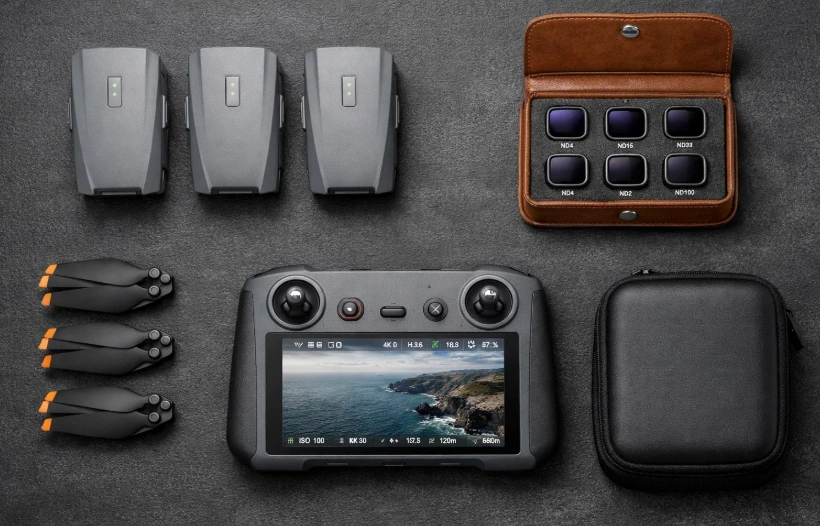
Extra Batteries: The single most important accessory. Budget at least 2-3 additional batteries for serious work. Flight time is your primary constraint, and multiple batteries dramatically extend productive shooting time.
ND Filters: Neutral density filters enable proper shutter speed for cinematic motion blur. Quality ND filter sets ($60-150) include ND8, ND16, ND32, and ND64 options for different lighting conditions. PolarPro and Freewell produce excellent filter systems for most popular drones.
Landing Pad: A landing pad ($15-40) provides a clean, visible surface for takeoffs and landings, protecting cameras and gimbals from debris. Particularly valuable when flying from dusty, sandy, or rough surfaces.
Carrying Case: Beyond protecting your drone, a good case ($50-200) organizes batteries, controllers, filters, and accessories. Waterproof hardshell cases offer maximum protection, while backpack-style cases provide better portability.
Battery Charging Hub: Intelligent charging hubs sequence battery charging, optimizing charge time and protecting battery health. Most manufacturers offer official hubs designed specifically for their battery systems.
Advanced Accessories
Propeller Guards: Essential for beginners and indoor flying. Guards ($20-50) protect propellers from impacts and prevent injuries, though they reduce flight time and performance slightly.
Tablet or Phone Sun Hood: Viewing screens in bright sunlight becomes challenging without a sun hood ($30-80). These folding accessories dramatically improve visibility during daytime flights.
Signal Boosters: Aftermarket signal boosters can extend transmission range, though they may violate regulations in some regions. Research local laws before purchasing.
Strobe Lights: Required for twilight flying and improving visibility. Quality LED strobe lights ($15-40 per set) attach to landing gear and significantly increase aircraft visibility to both pilots and other air traffic.
Software and Apps
Flight Planning Apps: Professional operations benefit from flight planning software like Litchi, DroneDeploy, or Pix4D. These applications enable automated waypoint missions, mapping, and 3D modeling.
Editing Software: Adobe Premiere Pro and Final Cut Pro remain industry standards, but DaVinci Resolve offers professional-grade editing free. Specialized tools like LumaFusion (mobile) enable field editing on tablets.
Maintenance Tracking: Apps that log flights, track battery cycles, and schedule maintenance help professionals manage drone fleets and comply with documentation requirements.
Maintenance and Care Tips
Proper maintenance extends drone lifespan and ensures reliable performance. Follow these best practices:
Battery Management
Batteries represent significant investment and require careful handling:
- Storage: Store batteries at 50-60% charge for long-term storage (over 7 days)
- Temperature: Avoid extreme temperatures; fly in 32-104°F (0-40°C) range
- Cycle Tracking: Most batteries last 200-300 charge cycles; track usage
- Pre-flight Conditioning: Bring batteries to appropriate temperature before flight
- Disposal: Properly recycle or dispose of swollen or damaged batteries
Regular Inspections
Before each flight session, inspect:
- Propellers for cracks, chips, or damage
- Motor bearings for smooth rotation
- Gimbal for free movement and alignment
- Body for cracks or loose components
- Battery connections for corrosion or damage
- Firmware updates from manufacturer
Post-Flight Care
After flying, especially in dusty or sandy environments:
- Wipe down aircraft with microfiber cloth
- Clean gimbal and camera lens carefully
- Inspect propellers and motors for debris
- Review flight logs for anomalies
- Download and backup footage promptly
- Recharge batteries to storage level if not flying soon
Firmware Updates
Manufacturers regularly release firmware updates addressing:
- Performance improvements
- New features
- Bug fixes
- Safety enhancements
- Regulatory compliance
Always update firmware using reliable internet connections and ensure adequate battery charge during updates. Read release notes to understand changes and potential impacts.
Common Mistakes to Avoid When Buying a Drone
Learn from others’ experiences with this best drone buying guide advice:
Mistake #1: Buying Based Solely on Price
The cheapest option rarely provides the best value. Ultra-budget drones often lack essential safety features, produce poor-quality footage, and frustrate users with unreliable performance. Conversely, beginners don’t need the most expensive professional models.
Solution: Match the drone to your actual needs and skill level. Mid-range models typically offer the best value for most users.
Mistake #2: Ignoring Total Cost of Ownership
The drone’s purchase price represents only part of the investment:
- Extra batteries ($80-200 each)
- Filters and accessories ($100-300)
- Insurance ($100-500 annually)
- Registration and certification fees
- Replacement propellers and parts
- Carrying case and storage solutions
Solution: Budget 30-50% beyond the drone’s price for essential accessories and initial setup costs.
Mistake #3: Overlooking Learning Curve
Advanced drones with numerous features can overwhelm beginners. Complex professional drones require significant investment in learning before producing quality results.
Solution: Consider starting with a mid-range model that offers room for growth. Many professionals still use mid-range drones for most work, reserving high-end equipment for specialized projects.
Mistake #4: Neglecting Insurance and Protection Plans
Drones crash. Even experienced pilots experience accidents. Replacing a $1,000+ drone without insurance or care plan creates significant financial burden.
Solution: Evaluate DJI Care Refresh, Autel Protection Plan, or third-party drone insurance. These programs typically cost 10-15% of the aircraft value but provide peace of mind and significant savings if accidents occur.
Mistake #5: Ignoring Local Regulations
Purchasing a drone without understanding local flight restrictions leads to frustration or legal issues. Some areas severely restrict drone operations.
Solution: Research local regulations before purchasing. If you live in highly restricted airspace, consider whether drone ownership makes practical sense for your situation.
Future Trends in Drone Technology
Understanding emerging trends helps inform purchase decisions. Here’s what’s shaping the drone industry in 2026 and beyond:
Enhanced AI and Automation
Artificial intelligence continues revolutionizing drone capabilities:
- Subject Recognition: Drones increasingly identify and track specific objects, people, or animals automatically
- Scene Analysis: AI-powered scene understanding optimizes camera settings automatically
- Autonomous Navigation: Advanced pathfinding enables drones to navigate complex environments independently
- Intelligent Editing: AI-assisted editing tools automatically identify best shots and create edited sequences
Improved Battery Technology
Battery innovation remains critical for drone advancement:
- Solid-State Batteries: Next-generation battery technology promises 50% longer flight times with improved safety
- Fast Charging: New charging technologies enable 80% charge in 15-20 minutes
- Battery Health Management: Sophisticated battery management systems extend cycle life and optimize performance
Regulatory Evolution
Drone regulations continue adapting to technology:
- Remote ID Implementation: Full Remote ID requirement takes effect in the US, enabling airspace authorities to identify drones electronically
- Beyond Visual Line of Sight (BVLOS): Gradual relaxation of VLOS requirements for certain operations and airspace
- Drone Traffic Management: UTM systems coordinate multiple drone operations in shared airspace
- International Harmonization: Growing alignment between different countries’ regulations simplifies international operations
Specialized Applications
Drones increasingly serve specialized roles:
- Delivery Services: Limited commercial drone delivery expanding in specific markets
- Emergency Response: First responder integration for search and rescue, disaster assessment
- Infrastructure Inspection: Automated inspection services for bridges, power lines, cell towers
- Environmental Monitoring: Wildlife tracking, pollution monitoring, agricultural assessment
Conclusion
Choosing the right drone in 2026 requires balancing multiple factors: budget, intended use, skill level, and future growth potential. This comprehensive drone buying guide has explored everything from budget-friendly options perfect for beginners to professional-grade systems for commercial operators.
The key to successful drone purchase lies in honest assessment of your needs. Beginners benefit from starting with capable mid-range models like the DJI Mini 3 or Air 3S, which provide room for skill development without overwhelming complexity or cost. Serious content creators and professionals find exceptional value in models like the Mavic 3 Pro, which deliver cinema-quality results without the bulk and expense of dedicated cinema platforms.
At Etagicon, we’re passionate about helping drone enthusiasts make informed decisions and get the most from their aerial photography journey. For more detailed reviews, comparison guides, and the latest drone industry news, explore more blogs on our website where we regularly cover everything from beginner tutorials to advanced cinematography techniques.
Frequently Asked Questions
Q: Do I need a license to fly a drone recreationally?
A: In the US, recreational pilots must register drones over 250g with the FAA and pass the TRUST test. Commercial operations require Part 107 certification regardless of weight.
Q: How long do drone batteries typically last?
A: Modern mid-range drones offer 20-30 minutes flight time per battery. Batteries last 200-300 charge cycles before capacity significantly degrades.
Q: Can I fly my drone in rain or snow?
A: Most consumer drones are not waterproof and shouldn’t fly in precipitation. Some professional-grade models have weather-resistant ratings (IP45+) but remain limited.
Q: What’s the difference between GPS and vision positioning?
A: GPS uses satellite signals for outdoor navigation in open areas. Vision positioning uses downward cameras for indoor or GPS-weak environments. Most drones combine both systems.
Q: How do I know if I can fly in a specific location?
A: Use apps like B4UFLY, AirMap, or Aloft to check airspace restrictions, no-fly zones, and temporary flight restrictions before each flight session.



One Response